登錄/註冊後可看大圖
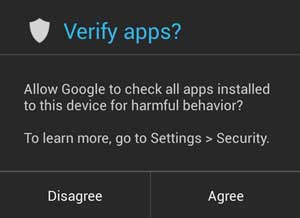
掃描過程十分快速。系統會首先檢查要安裝的 App,跟 Google Play Store 上作出比對,檢查是否一樣。若果跟 Play Store 內的 App 一樣,就會繼續進行安裝。
若果要安裝的 App 包含任何已知的安全風險,系統就會作出攔阻,不會進行安裝。
若果未能找到實質的安全威脅,但 App 可能有潛在風險,系統就會向用家作出提示,並查間是否繼續安裝。
If Google’s servers recognize the app as a known safe program, your installation will continue uninterrupted. If it matches it to an app that’s known to be dangerous, the system will prevent you from installing it. And if the app raises some red flags but no definite evidence of harm, the system will alert you of the situation and let you decide whether you want to proceed.
雖然好像有很多步驟,但整個掃描過程只是一瞬間,跟現有安裝 Apps 時沒有明顯分別。
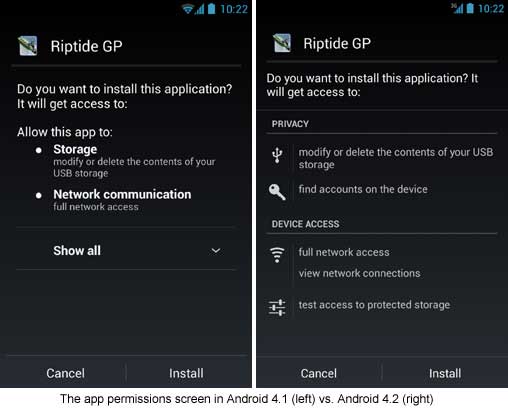
安裝 App 權限界面改動
除了新增掃描功能,安裝 Apps 時顯示的權限要求界面亦會改進,提供更清晰明確的訊息。
資料來源:Computer World
| 歡迎光臨 Android 台灣中文網 (https://apk.tw/) | Powered by Discuz! X3.1 |